Run SiFli SDK RF Tests
The SDK separates Bluetooth RF validation into signaling, non-signaling, and single-item tests. Choose the route from the test objective before loading a test firmware.
| Content | Family scope |
|---|---|
| Test-mode comparison and measurement sequence | Consolidated workflow for SF32LB52x, SF32LB55x, SF32LB56x, and SF32LB58x. |
| Topology screenshots and HCI command matrix | SF32LB52x source examples; use the target family's command and pin documentation for implementation. |
CONFIG_BT_RF_TEST configuration |
Applies to the documented non-55x path; SF32LB55x bt_rftest does not use this symbol. |
| UART pins, packet values, and command syntax | Target-family and SDK-release dependent; verify the project configuration and bt_rftest help. |
Select the test mode
| Mode | Use it for | SDK entry | Control path |
|---|---|---|---|
| BT signaling | BQB/QDID qualification and protocol-conformant performance | bt_cm dut, gap_enb_dut_mode_req() |
Tester air interface and LMP test control |
| BT non-signaling | Development RF tuning and production screening | bt_rftest, bt_enter_no_signal_dut_mode() |
Local vendor HCI |
| BLE non-signaling (SIG DTM) | BLE RF screening and SIG DTM items | bt_rftest bletx/blerx, ble_enter_dut_mode() |
Local HCI or standard HCI forwarded by bt_cm uart_dut |
| Single-item | Board-level RF tuning and FCC/CE pre-compliance | bt_cm uart_dut + SiFli_RfTool |
PC tool sends one low-level operation at a time |
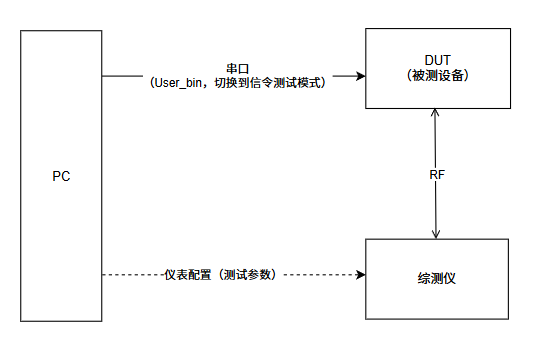
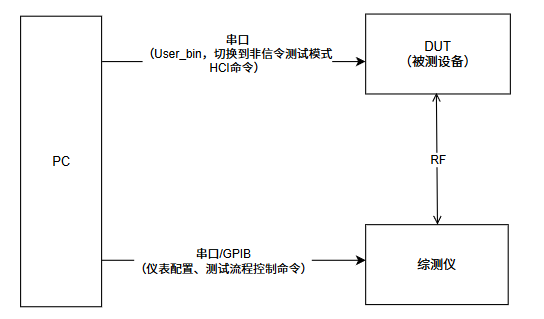
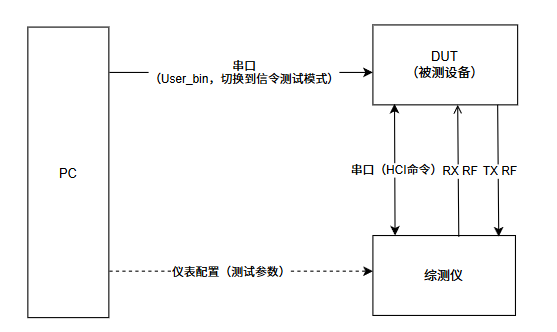
Signaling establishes a real Bluetooth link and is the qualification route. Non-signaling directly holds RF in a fixed channel/power/transmit or receive state and is the usual development/production path. Single-item tests use the PC tool for precise carrier or modulation control and an analyzer or power meter. BT non-signaling and single-item tests are SiFli vendor workflows, not BQB tests.
The topology figures below come from the SF32LB52x RF-test guide. They highlight the differences between the PC, DUT, tester, and UART/HCI/RF paths; use the target family's table for the actual default UART and pin map.
Choose firmware and configure the project
rf_test.bin is an internal SiFli RF-test build and is not distributed as a normal SDK artifact. User.bin is any SDK-built application firmware; the RF functions are integrated into the protocol stack and are entered with FinSH commands such as bt_cm dut, bt_cm uart_dut, and bt_rftest.
For a user build, enable the relevant options:
CONFIG_BT_RF_TEST is not used for the SF32LB55x bt_rftest path. CONFIG_BT_FINSH is for tracing and is not required for the test commands. When the control path uses the SDK's own IPC UART, set CONFIG_IPC_USE_OWN_DEVICE=y and CONFIG_IPC_OWN_DEVICE_NAME="uart2" as appropriate for the board. The SDK examples example/bt/spp/ and example/bt/HCI_over_uart/ provide starting points.
BT signaling test
- Expose
VBAT,GND, and UART1 TX/RX on the DUT. Default UART1 pins vary by package; use the project's pin configuration. - For BLE signaling, connect UART1 to a PC and send
bt_cm uart_dut. Verify04 0E 04 XX 03 0C 00, then move the UART to the tester. - For BT signaling, keep the DUT awake, send
bt_cm dut, verifyWrite scan enable success, and connect RF coax to the tester. - In Bluetooth Signaling, BLE uses USB-to-RS232 EUT control at 1,000,000 baud; BT uses
None (EUT Control off)and discovers the DUT over the air. - Run TX in
Bluetooth 1 Multi Eval.and RX inBluetooth 1 RX Meas.. Use BER for Classic BT and PER for BLE; reduce tester TX level to determine sensitivity.
BT/BLE non-signaling commands
Use the FinSH shell after the RF test path is enabled:
bt_rftest enter
bt_rftest bttx <channel> <packet_type> <power> <length>
bt_rftest btrx <channel> <packet_type> <power>
bt_rftest btstop
bt_rftest exit
The exact argument order and accepted packet values are release-specific; copy the syntax printed by bt_rftest help in the target SDK. RX packet statistics are meaningful; TX packet count is not a received-packet measurement. BLE DTM uses bt_rftest bletx/blerx, or standard HCI LE_Transmitter_Test, LE_Receiver_Test v2, and LE_Test_End. BLE channels are 0–39 and PHY values are 1M/2M/Coded; Classic BT channels are 0–78. BT and BLE share the RF, so do not run them simultaneously.
Single-item testing with SiFli_RfTool
Connect DUT UART1 to the PC at 1,000,000 baud and RF through coax to a tester, spectrum analyzer, or power meter. Send bt_cm uart_dut, verify 04 0E 04 XX 03 0C 00, then select the family, BLE or BT non-signaling mode, and COM port in SiFli_RfTool.exe. Stop TX/RX before changing channel, PHY, packet type, or power. For BLE RX, a tester can send 1,500 packets; calculate PER = (1500 - received) / 1500 × 100% and record RSSI. For Classic BT RX, use a CMW500 GPRF waveform and record RSSI, packet/bit error counts, and BER/PER. Apply cable-loss compensation and distinguish conducted from radiated results.
Record the result
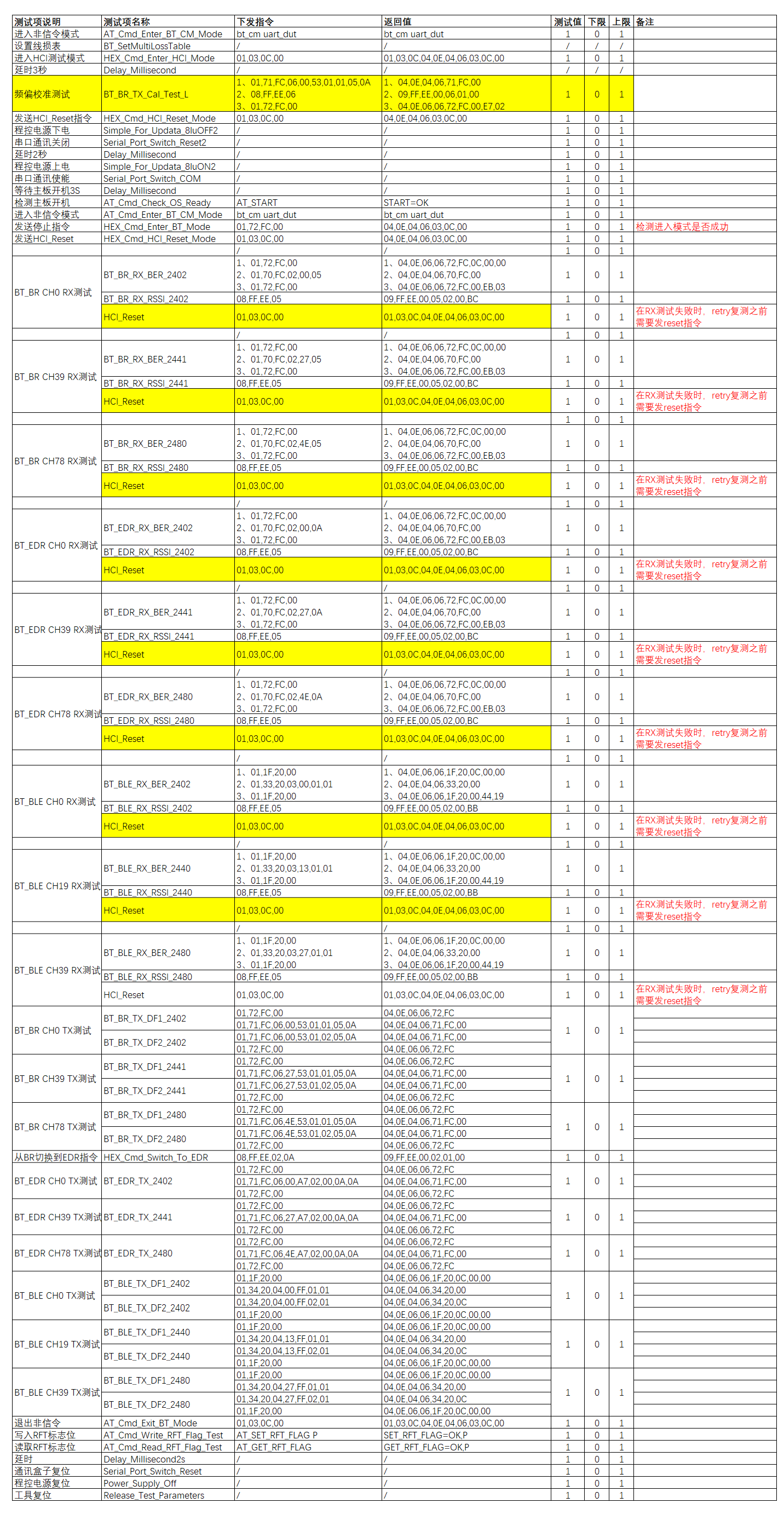
The source guide also includes a complete HCI command/return-value matrix. Use it when a command is sent but the DUT does not enter the expected state; do not treat every vector in that table as a portable API. Match commands to the target SDK and chip family.
Keep the family, SDK revision, firmware identity, UART pins, RF path, cable loss, instrument model/configuration, channel, PHY/packet type, power setting, RX counts, RSSI, BER/PER, and board revision with every result. See the detailed official guides for SF32LB52x, SF32LB55x, SF32LB56x, and SF32LB58x.